 The Hosting Lexicon
Plans and billing terms
The short version
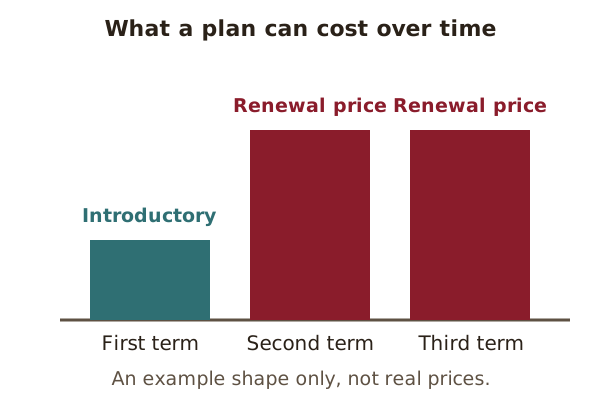
- An introductory price is a low first price. The renewal price that follows can be higher, and renewal is often automatic.
- Overage is a charge for using more than a plan allows. Unmetered and unlimited don't mean "no limits at all".
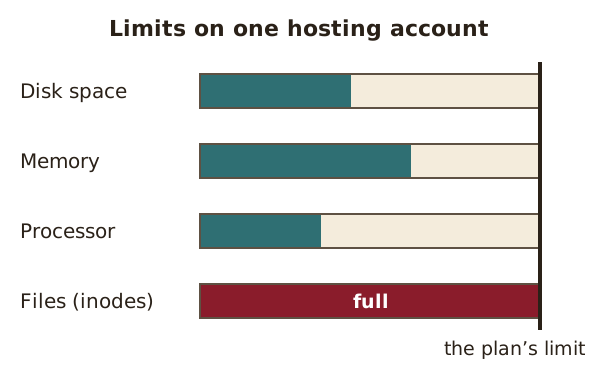
- Plans also limit disk space, files (inodes) and processing power.
- Migration means moving a site from one host to another.
Introductory price
An introductory price is a low price offered for the first period of a plan, to win new customers.
Setting a low starting price to attract buyers is a known pricing strategy.[1] A low first price can be followed by a higher one. A regulator notes the same pattern with "free trial" offers that turn into regular charges.[2]
Before signing up, check the full cost and what happens when the first term ends.[2]
See also: Renewal.
Renewal
Renewal is when a plan rolls over into a new billing period.
Many subscriptions renew automatically. The card on file is charged for the new period.[3] A regulator warns that an offer can turn into "an automatic charge or renewal".[2]
The renewal terms are often in the small print, which few people read.[2] It helps to note any cancellation deadlines.[2]
See also: Introductory price · Migration.
Overage
An overage is an extra charge for going over a plan's allowance.
A data cap is a limit on how much data can be moved.[4] Going over it usually means paying more.[4] For example, a plan might include a set amount of data transfer each month. A sudden rush of visitors could push the site past it.
See also: Data transfer · Burstable billing.
Unmetered
Unmetered means the host does not count how much data you move, but it does cap how fast the line is.[5]
So there is no limit on total data, only on speed.[6] Think of a tap that can run all day, but only at a set flow.
"Unmetered" is often confused with "unlimited".[5] They are not the same thing.
See also: Bandwidth · Unlimited.
Unlimited
"Unlimited" on a hosting plan means there is no fixed number, but other rules still apply.
Unlimited hosting is widely advertised. But it is usually limited by the host's acceptable use policy and terms of service.[6]
See also: Acceptable use policy (AUP) · Resource limits.
Acceptable use policy (AUP)
An AUP is the set of rules a host writes about how its service may and may not be used.[7]
It is sometimes called a fair use policy.[7] For example, most hosts forbid storing copyrighted material that the customer does not own.[5]
See also: Unlimited.
Resource limits
Resource limits are caps on how much of a server's power, memory and storage one account can use.
Shared hosting usually has usage limits.[8] A VPS has a set amount of processor time, memory and disk space too.[6] A limit on storage space is called a disk quota.[9]
See also: Inode · Shared hosting.
Inode
An inode is the record a Linux-style file system keeps for each file or folder.[10]
Every file uses one inode, whatever its size. The number of inodes is fixed, so it limits how many files can be stored.[10]
For example, a site with thousands of tiny cached files can run out of inodes long before it runs out of space.
See also: Resource limits · Cache.
Burstable billing
Burstable billing charges for bandwidth by looking at busy periods, while ignoring the very busiest moments.[11]
Usage is checked every five minutes. At the end of the month, the top 5% of readings are dropped.[5] The bill is based on the highest reading left.[5] This is called the 95th percentile method.[11]
So a short spike, such as a news story going viral for an hour, may not raise the bill.
See also: Bandwidth · Overage.
Pay as you go
Pay as you go means paying for the resources you actually used, rather than a flat fee set in advance.[12]
It is common with cloud hosting. The provider measures and reports how much each customer uses.[13] A site that is quiet most of the month pays less than one that is busy all month.
See also: Cloud hosting · Serverless.
Migration
Migration is moving a website's files and data from one host or server to another.[14]
The first step is a full backup. For a WordPress site, that means the files and the database.[15] Those copies are then set up on the new server.
For example, a site might move from shared hosting to a VPS once it grows.
Sources
- Penetration pricing, Wikipedia (accessed 2026-10-18)
- Commissioner's Blog: Automatic renewals, Consumer Protection, Government of Western Australia (accessed 2026-10-18)
- Subscription business model, Wikipedia (accessed 2026-10-18)
- Data cap, Wikipedia (accessed 2026-10-18)
- Dedicated hosting service, Wikipedia (accessed 2026-10-18)
- Virtual private server, Wikipedia (accessed 2026-10-18)
- Acceptable use policy, Wikipedia (accessed 2026-10-18)
- Disk quota, Wikipedia (accessed 2026-10-18)
- inode, Wikipedia (accessed 2026-10-18)
- Burstable billing, Wikipedia (accessed 2026-10-18)
- Web hosting service, Wikipedia (accessed 2026-10-18)
- Cloud computing, Wikipedia (accessed 2026-10-18)
- Data migration, Wikipedia (accessed 2026-10-18)
- Migrating WordPress (Advanced Administration Handbook), WordPress.org (accessed 2026-10-18)